
10 Best Social Media Scheduling Tools in 2026
Managing several social media accounts shouldn't mean hours of switching between apps, publishing posts by hand, or paying hundreds of dollars a month.
The best social media scheduling tools let you plan your content, schedule posts to every network at once, and get back to running your business.
That's why we built Posttyy: a simpler, more affordable way to schedule social media, with unlimited posts, one content calendar and straightforward pricing. Here's how it compares with the most popular scheduling tools in 2026.
1. Posttyy: unlimited scheduling without the complexity
Our pick for straightforward social media scheduling.
Posttyy is built for people who want to spend less time managing social media and more time creating content. There are no posting limits to watch and no enterprise features to pay for. You get what you need to plan, schedule and publish, and everything lives in one place.
Unlimited post scheduling
Stop counting posts. Every Posttyy plan includes unlimited scheduling, so you can plan a whole month of content in one sitting and keep a steady presence on every account.
One dashboard for all your accounts
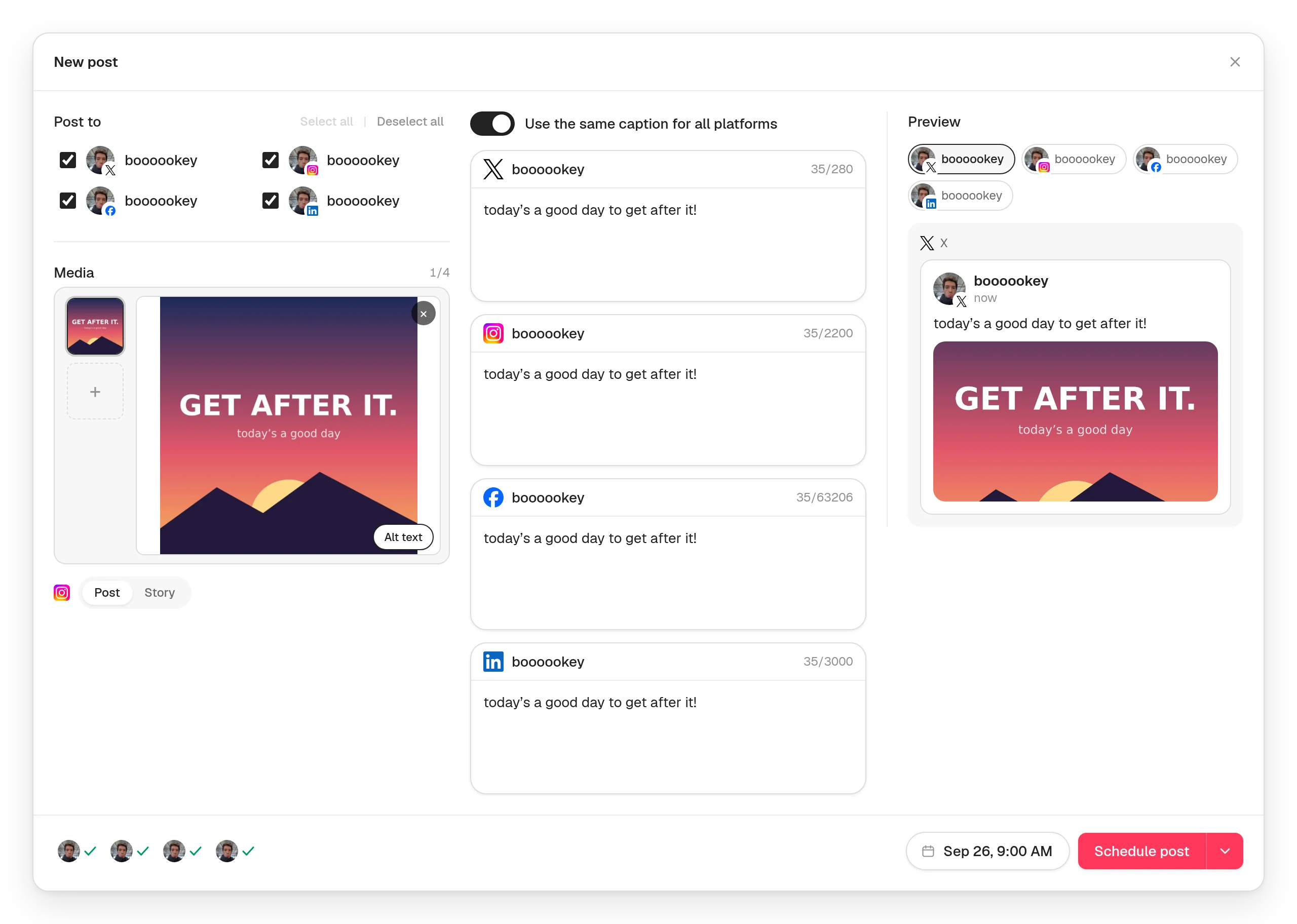
Connect your X, Instagram, Facebook, LinkedIn and YouTube accounts, including several on the same network, and schedule to any of them from one place. Tick the accounts a post should go to, and each one gets its own copy at the time you pick.
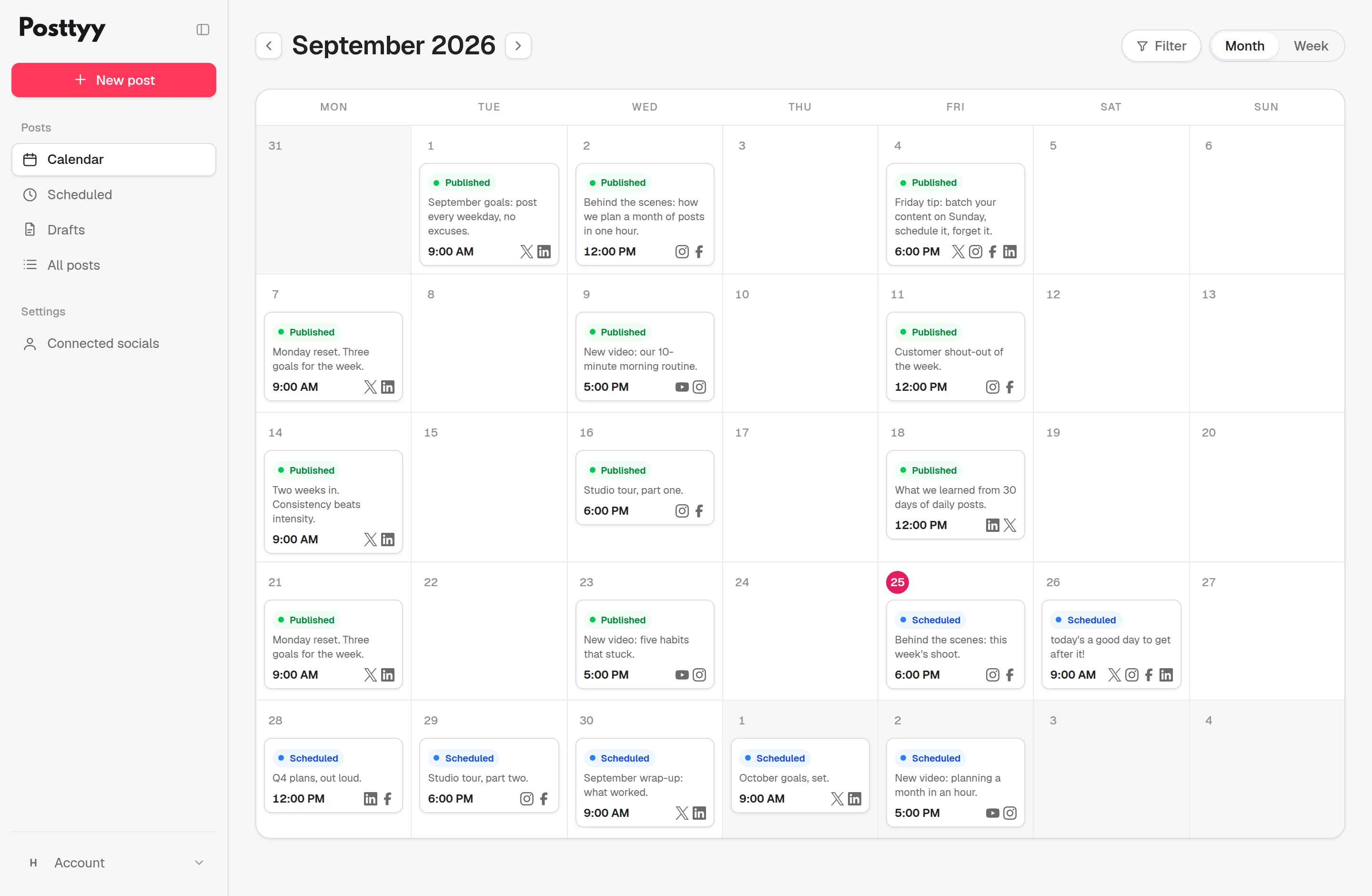
A content calendar that keeps you on track
See everything that's published and everything that's coming up, by month or by week. Drag a post to another day to move it, and filter the calendar by network, account or status. Ideas that aren't ready yet wait in Drafts until you give them a date.
Create once, customise for every platform
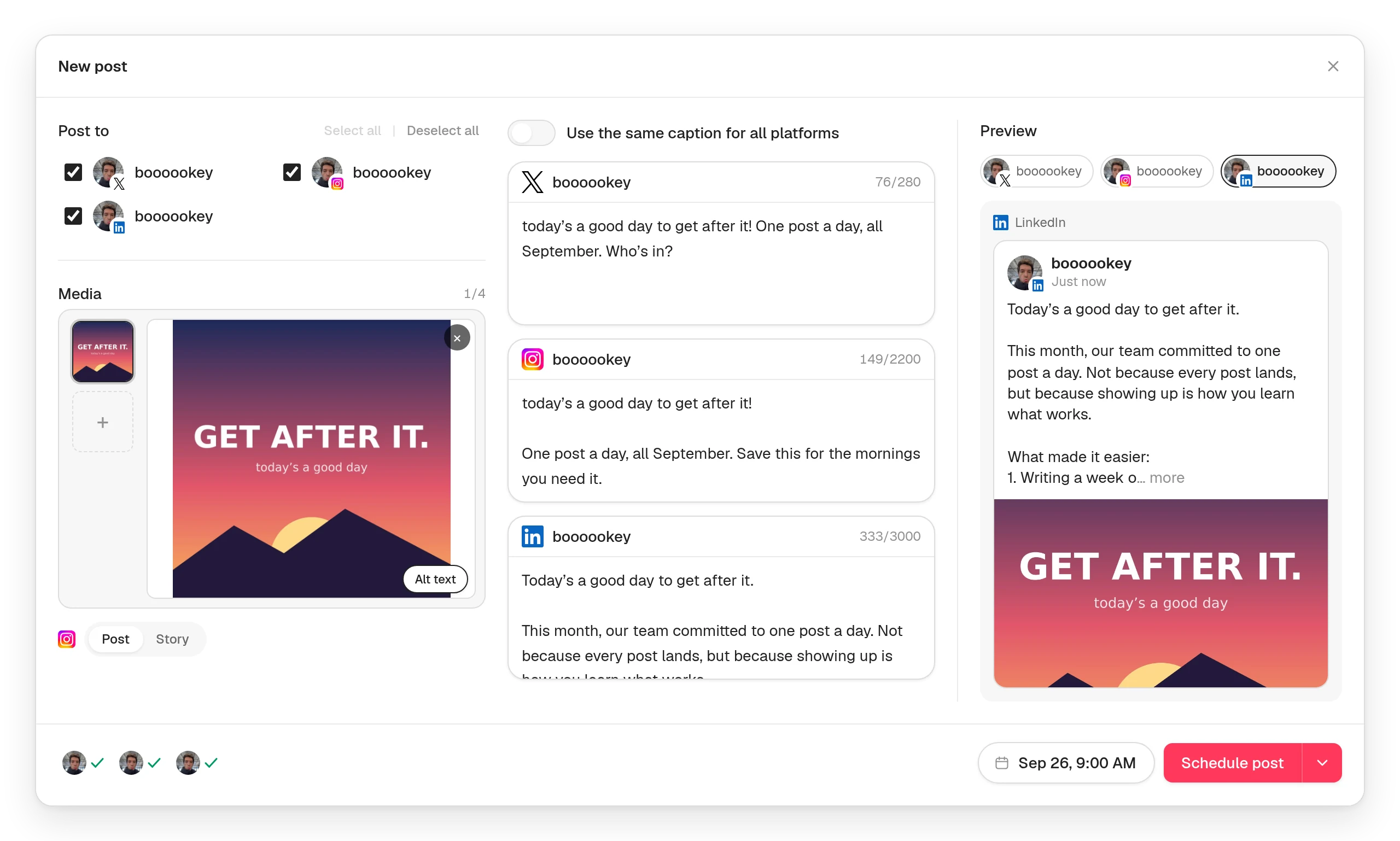
Your content shouldn't read the same everywhere. Write your post once, then give any network its own caption: short for X, longer for LinkedIn, hashtags for Instagram. The live preview shows exactly how the post will look on each network, and for Instagram you can see it in your profile grid before it goes out.
Automatic publishing
Schedule a post and Posttyy publishes it at that minute. You don't need to be online, and there's no phone notification to tap. If a network ever refuses a post, Posttyy tells you which one and why, in plain words, and your other accounts still publish.
Media checked before you schedule
Posttyy checks every photo and video against the rules of each network you've chosen as you add it, not after a post fails. Photos over 5 MB are shrunk for you, WebP images are converted for networks that need JPEG, and a video that's too long for one network is flagged before you schedule.
Straightforward, affordable pricing
You shouldn't need an enterprise subscription just to schedule posts. Posttyy charges by how many accounts you connect, not per network or per user, and every plan includes unlimited posts.
| Plan | Connected accounts | Monthly | Billed yearly |
|---|---|---|---|
| Starter | 2 | $19/month | $15.83/month |
| Growth | 10 | $39/month | $32.50/month |
| Pro | Unlimited | $59/month | $49.17/month |
Where Posttyy posts
- X: posts with photos, a GIF or a video.
- Instagram: photo posts, carousels, Reels and Stories.
- Facebook: posts to the Pages you manage.
- LinkedIn: posts to your personal profile.
- YouTube: videos and Shorts, with a title, category and thumbnail.
TikTok, Threads and Pinterest are built and waiting on those networks' approval.
Who Posttyy is for
- Creators who want to plan content without complicated workflows.
- Small businesses managing several social media accounts.
- Growing brands that need a consistent publishing schedule.
- Freelancers and agencies posting for several clients, with unlimited accounts on Pro.
- Anyone who wants unlimited scheduling at a predictable price.
Posttyy is a scheduler, not an all-in-one suite. If you need a shared inbox, social listening or client reports, a suite like Hootsuite or Sprout Social is built for that. If you mostly need your posts to go out on time, you'll pay far less with Posttyy.
2. Buffer: a popular scheduler with per-channel pricing
Buffer is a well-known scheduler for creators and small businesses. It's simple to use, has a free plan, and connects to a broad range of networks.
But its paid Essentials plan is priced per channel, so the bill grows with every account you add. At $6 per channel a month, 10 channels cost $60 a month. Posttyy's Growth plan covers 10 accounts for $39, which is $21 less each month, with unlimited posts.
More in our guide to the best Buffer alternatives.
3. Hootsuite: comprehensive social media management
Hootsuite is an established platform that pairs scheduling with analytics, social listening and team collaboration. It's built for businesses with complex social media operations, and its plans start at $99 a month.
Do you need all of that to schedule your Instagram, Facebook and LinkedIn posts? If scheduling is the main job, Posttyy does it from $19 a month. See Hootsuite alternatives for small businesses.
4. Later: visual content planning
Later is known for visual planning, especially for Instagram and TikTok, and is popular with creators and brands that live on visual content.
Posttyy covers the Instagram essentials too, with a preview of your post in your profile grid, and adds straightforward scheduling to X, Facebook, LinkedIn and YouTube from the same post. See how to schedule Instagram posts with Posttyy.
5. Publer: flexible per-account pricing
Publer prices by account, from $5 per account a month, which works well for one or two profiles.
As you grow, flat pricing is easier to plan around. At 10 accounts, Publer's Professional plan is $45 a month and Posttyy's Growth plan is $39. Posttyy Pro covers unlimited accounts for $59.
6. SocialBee: content recycling and scheduling
SocialBee sorts posts into categories and can re-share your evergreen content on a schedule. Plans start at $29 a month ($24.20 billed yearly).
If you mostly publish fresh content, Posttyy keeps things simpler: write it, pick the accounts, schedule it.
7. Sprout Social: advanced social media management
Sprout Social offers analytics, reporting, engagement tools and customer care for businesses with large social media teams. It's priced per user, from $199 per user a month ($169 billed yearly).
Not every business needs advanced reporting or customer service workflows. For organising your content and publishing consistently, Posttyy costs a fraction of the price.
8. Metricool: scheduling with analytics
Metricool pairs scheduling with detailed analytics and competitor tracking, and has a free plan for one brand with 20 published posts a month. It suits people who want reports alongside their calendar. Posttyy puts publishing first, with unlimited posts on every plan.
9. SocialPilot: scheduling for small agencies
SocialPilot bundles accounts and users into flat plans, from $30 a month for 7 accounts and 1 user, with an inbox and approvals on higher tiers. It suits agencies with a few team members. If you post on your own, Posttyy gives you 10 accounts for $39.
10. Vista Social: a full suite for agencies
Vista Social combines scheduling with an inbox, review management and listening, from $79 a month for 15 profiles and 2 users ($64 billed yearly). It suits agencies managing many profiles. If scheduling is what you need, Posttyy starts at $19 a month.
Social media scheduling tools compared
| Tool | Primary focus | Paid plans from | Free plan |
|---|---|---|---|
| Posttyy | Unlimited scheduling for multiple accounts | $19/month | 7-day trial |
| Buffer | Simple scheduling, many networks | $6/channel/month | Yes |
| Hootsuite | Comprehensive management | $99/month | No |
| Later | Visual content planning | See Later's site | Yes, limited |
| Publer | Per-account scheduling | $5/account/month | Yes |
| SocialBee | Evergreen content recycling | $29/month | No |
| Sprout Social | Reporting and customer care | $199/user/month | No |
| Metricool | Scheduling with analytics | Priced by brand | Yes |
| SocialPilot | Small agencies | $30/month | No |
| Vista Social | Full suite for agencies | $79/month | No |
Why pay more for social media scheduling?
Social media platforms have grown complicated: reporting dashboards, listening, customer service tools and enterprise workflows. Those can be valuable, but not everyone needs them.
If your goal is to create content, schedule it and show up consistently on every network, you don't need a management suite. You need unlimited scheduling, one calendar, automatic publishing and a price you can predict. That's Posttyy.
New to scheduling? Start with how to schedule social media posts, or see how to post to several networks at once. Looking for something free? Here are the best free social media schedulers and what each one allows.
Frequently asked questions
What is the best social media scheduling tool for small businesses?
It depends on how many accounts you manage and what you need beyond scheduling. Posttyy is built for small businesses that want straightforward scheduling to several networks, unlimited posts and predictable pricing, from $19 a month, without a complicated management suite.
Can I schedule unlimited social media posts?
Yes. Every Posttyy plan includes unlimited post scheduling, so you can plan content as far ahead as you like without a monthly allowance.
Can I manage multiple social media accounts in one place?
Yes. Posttyy puts all your connected accounts on one calendar, and one post can go to as many of them as you tick. Starter connects 2 accounts, Growth connects 10, and Pro has no limit.
Is Posttyy cheaper than Buffer?
It depends on how many accounts you connect. Buffer Essentials is $6 per channel a month, so for 6 channels or fewer Buffer usually costs less. From 7 accounts, Posttyy Growth costs less: $39 a month for up to 10 accounts, where 10 Buffer channels cost $60.
Which social networks does Posttyy support?
Posttyy publishes to X, Instagram, Facebook, LinkedIn and YouTube. TikTok, Threads and Pinterest are built and waiting on those networks' approval.
Is there a free trial?
Yes. Every plan starts with a 7-day free trial. You add a card when you start it, you aren't charged until the trial ends, and you can cancel anytime.
Does Posttyy have a free plan?
No. Posttyy has a 7-day free trial, then plans start at $19 a month, with unlimited posts on every plan.
Start scheduling with Posttyy
You don't need a complicated platform to build a consistent presence online. With Posttyy, you plan your content in one place, schedule unlimited posts and publish automatically across your connected accounts. Spend less time managing social media, and more time creating content worth sharing.