How to schedule posts across multiple social media platforms at once
Posting the same news to X, Instagram, Facebook and LinkedIn one app at a time takes four times as long as it should. With a scheduler, you write the post once, tick every account it should go to, and it goes out everywhere at the time you pick. This guide shows how, step by step, using Posttyy, and how to make one post work on networks with very different rules.
The quick answer
- Sign up for Posttyy and connect every account you post to.
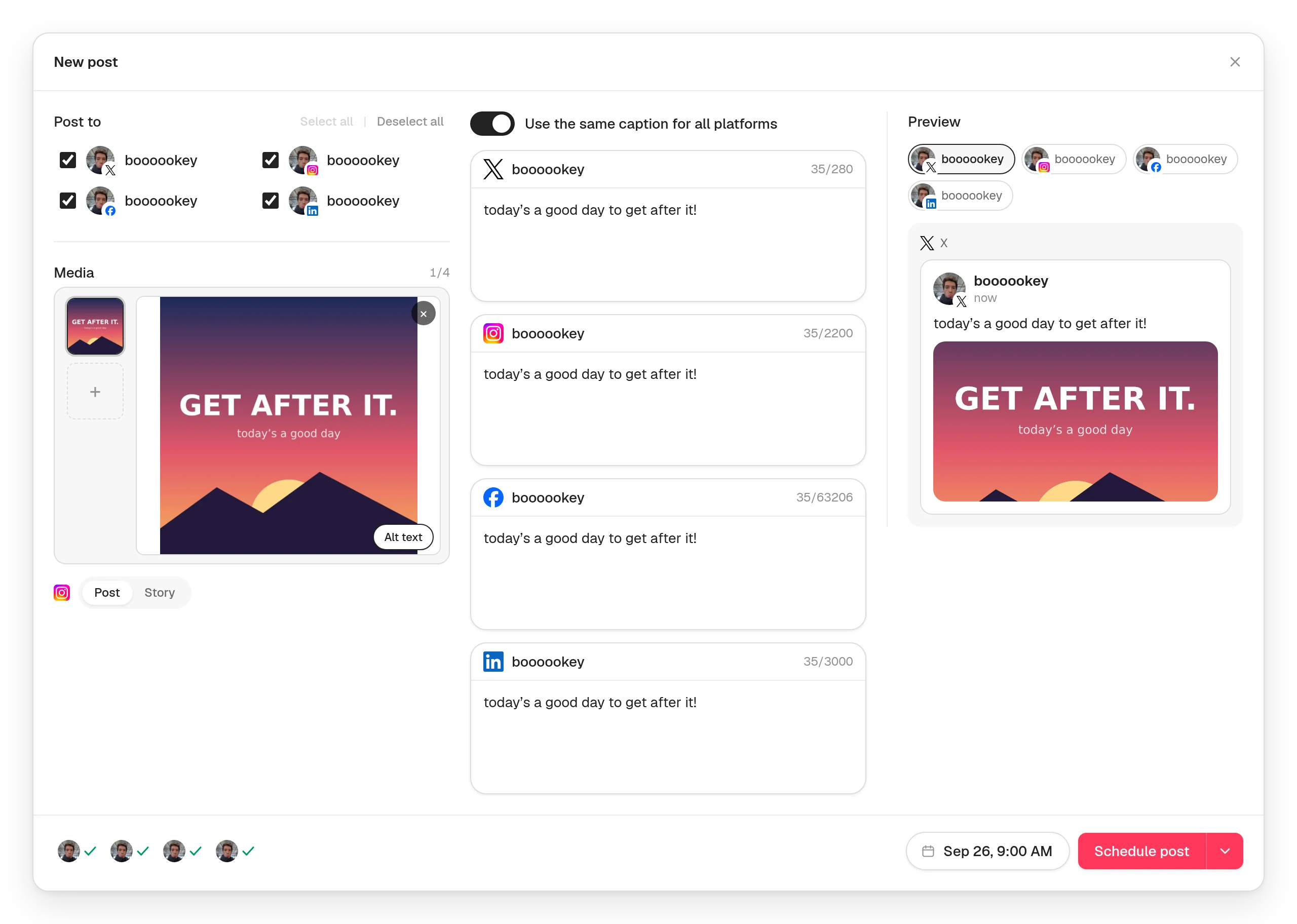
- Press New post and tick all the accounts, or press Select all.
- Write one caption, or turn off Use the same caption for all platforms to write one per network.
- Add media that every network you ticked accepts.
- Check the preview for each network.
- Pick a time and press Schedule post.
Step 1: Connect every account
Open Connected socials and connect each account. You can connect several accounts on the same network, like two Instagram profiles. Posttyy posts to X, Instagram, Facebook, LinkedIn and YouTube.
A few networks have rules about which accounts can be scheduled to: Instagram needs a free Business or Creator account, and Facebook only allows Pages, not personal profiles. The guide to scheduling social media posts lists them all.
Step 2: Start one post and tick every account
Press New post, or click a day on the calendar. Under Post to, tick each account the post should go to, or press Select all. Each account you tick gets its own copy of the post, published at the same time.
Step 3: One caption, or one per network
With Use the same caption for all platformson, you write once and every network gets the same words. Each network's box shows its own character count, and none takes more than the strictest one you ticked. With X in the mix, that's 280 characters.
Turn the switch off and each network gets its own box, starting from your shared caption. Change only the ones that need it:
- X: short and punchy, 280 characters at most. Put links in a reply, not the post.
- LinkedIn: longer and more personal, up to 3,000 characters. Short paragraphs.
- Instagram: the key line first, then 3 to 5 hashtags.
- Facebook: end with a question to get comments.
Step 4: Add media that works everywhere
This is where cross-posting usually goes wrong. Each network accepts different media, and a post carries one kind: a set of photos, one GIF, or one video. Here's what each network takes:
| Network | Words only? | Photos | GIF | Video |
|---|---|---|---|---|
| X | Yes | Up to 4 | Yes | Yes |
| No | Up to 10 | No | Yes | |
| Yes | Up to 10 | No | Yes | |
| Yes | Up to 10 | No | No | |
| YouTube | No | No | No | Yes |
So, in practice:
- One photo, or up to 4, works on X, Instagram, Facebook and LinkedIn. It's the safest choice. A square photo avoids awkward crops.
- A video works on X (up to 140 seconds), Instagram (as a Reel), Facebook and YouTube, but not LinkedIn yet.
- Words only work on X, Facebook and LinkedIn, but not Instagram or YouTube.
- A GIF only works on X.
You don't have to remember any of this. Posttyy checks every file against each network you ticked as you add it, and tells you which network would refuse it, before you schedule.
Step 5: Check the preview for each network
The preview has a tab for each account you ticked. Click through them to see the post as each network will show it, with its own caption and crop. A green tick beside each account at the bottom of the composer means that account is ready to go.
Step 6: Pick a time and schedule
Choose the date and time, then press Schedule post. Every account gets its copy at that minute. If one network refuses the post, the others still publish, and Posttyy tells you which one failed and why.
Want the networks at different times? Make a separate post for each time. For example, LinkedIn at 8am and Instagram at 7pm.
Should you post the same thing everywhere?
Posting the same news everywhere is fine, and it saves hours. What works best is the same idea, adapted to each network: the same photo, with a short caption on X, a longer story on LinkedIn, and hashtags on Instagram. That's what the per-network captions in Step 3 are for.
Other ways to post to several networks at once
- Meta Business Suite posts to Facebook and Instagram together, for free, but nothing else.
- The networks' own schedulers only post to themselves, so five networks means five apps.
- Other scheduling tools all do this too. See the best social media scheduling tools compared, or the best free ones.
Common questions
Can I post to all social media at once?
Yes. A scheduler like Posttyy sends one post to every account you tick, at the same time.
Will each network show the post differently?
Yes. Each network crops photos and cuts off captions its own way. The preview in Step 5 shows you each one before it goes.
Can I post to two accounts on the same network?
Yes. Connect both, and tick both on the post.
Is cross-posting bad for reach?
Not by itself. What hurts is a post that doesn't fit the network, like an X-length caption on LinkedIn, or a TikTok with its logo on Instagram. Adapt the caption and the media, and cross-posting works well.
For network-by-network detail, see the guides to scheduling X, Instagram, Facebook, LinkedIn and YouTube posts.