

People use Pinterest to plan what they will buy: a gift, a wedding, a room. That makes it a good place for an Etsy shop. A pin also lasts. It can send buyers to a listing for months after you post it. This guide shows how to set up, what to pin and how to keep it going without much time.
The quick answer
- Make a free Pinterest business account for your shop.
- Make five to ten boards named with words buyers search for.
- Make three to five different pins for each listing.
- Put the search phrase in each pin title and description.
- Link each pin to its Etsy listing.
- Post one to three new pins a day.
Step 1: Set up your Pinterest account
- Use a business account. It is free, and it gives you analytics.
- Use your shop name. Add what you sell: “Oak & Thread | Personalised leather gifts”.
- Write a short bio. Say what you make and who it is for. Use the words buyers type.
- Add your shop address to your profile.
Step 2: Make boards buyers search for
Name each board with a search phrase, not a clever name. Pinterest reads the board name to understand the pins on it.
| Weak board name | Better board name |
|---|---|
| My shop | Personalised leather gifts |
| Pretty things | Gifts for dad |
| New! | Handmade leather keyrings |
| Inspo | Third anniversary gift ideas |
Make boards for your product types, for the people who receive them and for the occasions. One listing can then fit two or three boards.
Step 3: Make several pins for each listing
One pin for a listing gives you one chance. A pin with a new picture is a fresh pin, even when it links to the same listing. Use the photos you already have:
- The product alone on a plain background.
- The product in use, in a hand or in a room.
- A close view of the detail or the material.
- The product in its packaging, as a gift.
- Two or three photos together, to show the colours.
Make each pin tall. Pinterest recommends 1,000 × 1,500 pixels. Etsy photos are often wide or square, so they need a new crop.
Step 4: Write titles people search for
A pin title can be up to 100 characters, and about 40 show in the feed. Put the search phrase first.
| Weak title | Better title |
|---|---|
| New keyring in the shop! | Personalised leather keyring: a gift for dad |
| Handmade with love | Handmade ceramic mug with speckled glaze |
| Perfect present | Third anniversary gift for him: engraved leather wallet |
Find the phrases in Pinterest's search box. Type your product and read the suggestions. The guide to pin titles and descriptions has formulas to copy.
Step 5: Link every pin to its listing
- Use the listing address, not your shop home page. A buyer who taps a keyring wants that keyring.
- Check the link. A pin to a sold-out or removed listing sends buyers to a dead end.
- Use a shop section for a pin that shows several products.
Step 6: Pin early for seasons
People plan on Pinterest weeks before they buy. Pin for an occasion well before it comes.
| Occasion | Start to pin |
|---|---|
| Christmas | October |
| Valentine's Day | Early January |
| Mother's Day and Father's Day | Six to eight weeks before |
| Wedding season | From January |
Step 7: Keep a steady pace
One to three new pins a day is enough for a small shop. With ten listings and five pins for each, you have fifty pins. That is a month at about two a day.
How to do it in Posttyy
Posttyy makes the pins and posts them. Etsy does not let other services read its pages, so start with your photos, not with the listing link.
- Open Bulk pins in the sidebar.
- Press Upload and choose the photos of one listing.
- Under How many pins?, type a number. Each pin starts on a different photo and a different layout.
- Type a Headline, such as “A gift for dad”.
- Type your search phrases in Keywords for the AI, then click the AI symbol in the Pin title and Description boxes. Or type the words yourself.
- Pick a Board.
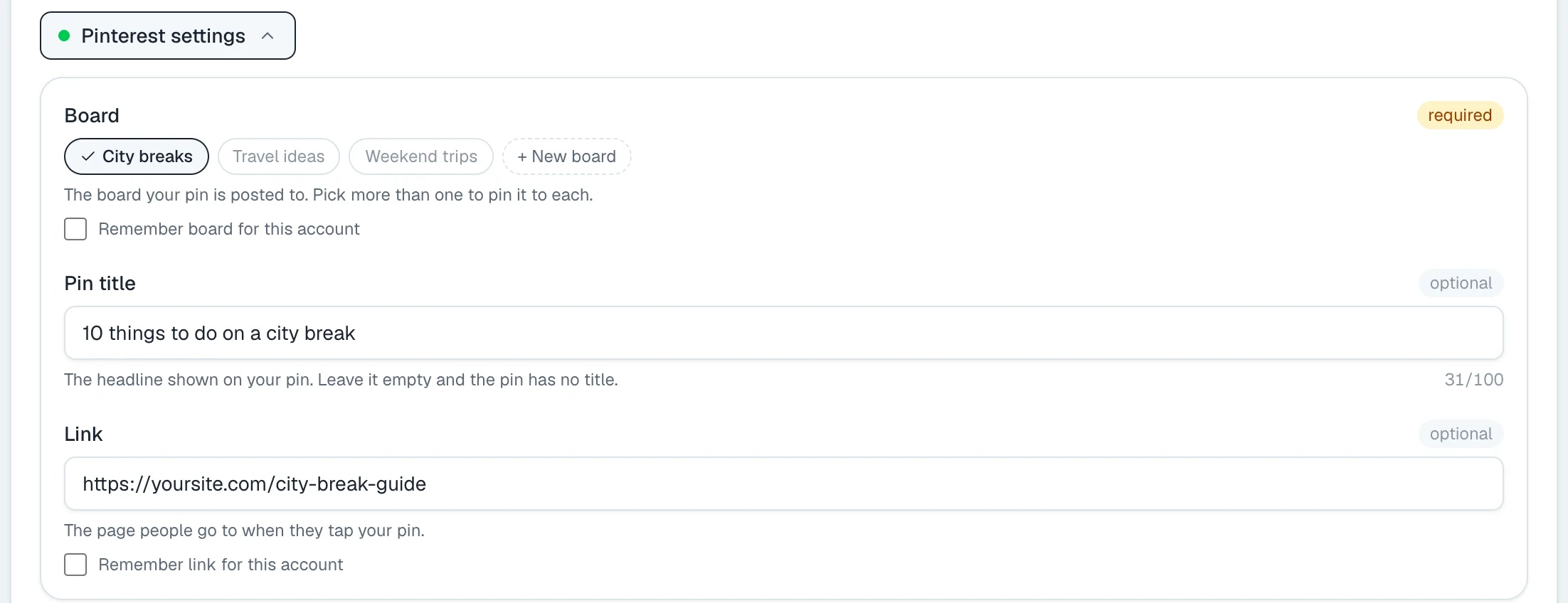
- Paste the address of the Etsy listing in Link.
- Pick a Start on day and the Pins a day, then press the Schedule button.
Repeat for your next listing. To schedule a single pin, use the composer:
Check what sells
- Wait two to four weeks. Pins start slowly.
- On Pinterest, open your analytics and sort by outbound clicks.
- In your Etsy shop stats, look at the visits that came from Pinterest.
- Make more pins for the listings that get clicks.
Common questions
Is Pinterest worth it for an Etsy shop?
For most shops that sell things people plan to buy, yes: gifts, home items, wedding items, clothes and craft supplies. A pin keeps sending visitors for months, so the work adds up.
Can I link a pin directly to my Etsy listing?
Yes. Put the address of the listing in the pin's link. People who tap the pin go to that listing.
How many pins should I make for one listing?
Three to five to start, each with a different photo. Add more for the listings that sell.
Do I need a Pinterest business account?
It is the better choice, because it is free and has analytics. Posttyy works with a personal or a business account.
Can Posttyy read my Etsy listing for its photos?
No. Etsy does not let other services read its pages. Upload the photos of the listing, and paste the listing address in the Link box.
For the size of a pin, see Pinterest pin sizes. For how many to post, see how many pins to post per day.