

Pinterest shows pins side by side in columns. A tall pin takes more room than a wide one, and a pin that is too tall gets cut. This guide gives every size you need, and a free way to resize a photo.
The quick answer
- Standard pin: 1,000 × 1,500 pixels. That is a 2:3 shape.
- File type: JPEG or PNG.
- File size: up to 20 MB on Pinterest's website.
- A pin taller than 2:3 can be cut off in the feed.
Every Pinterest image size
| Type | Shape | Size in pixels |
|---|---|---|
| Standard pin | 2:3 | 1,000 × 1,500 |
| Square pin | 1:1 | 1,000 × 1,000 |
| Tall pin | 1:2.1 | 1,000 × 2,100 |
| Profile cover | 16:9 | 1,920 × 1,080 |
Why 2:3 is the size to use
- Pinterest recommends it. Its product specifications name a 2:3 shape, or 1,000 × 1,500 pixels.
- It takes more room. Every pin has the same width in the feed. A taller pin is a bigger pin.
- It is not cut. Pinterest says that a pin taller than 2:3 might get cut off in the feed.
Other shapes, and when to use them
- Square, 1:1. Use it when you have a square photo from Instagram and no time to remake it. It gets less room than a 2:3 pin.
- Tall, 1:2.1. Use it for a long infographic or a list of steps. Put the headline at the top, because the bottom can be cut.
- Wide, 16:9. Do not use it for a pin. It is very small in the feed. It is the shape of the profile cover.
File type and file size
| Posttyy | ||
|---|---|---|
| File type | JPEG or PNG | JPEG, PNG or WEBP |
| Largest file | 20 MB on the website, 32 MB in the app | 5 MB |
| Pin title | 100 characters | 100 characters |
In Posttyy, one photo makes a standard pin and two to 5 photos make a carousel pin.
- Use JPEG for a photo. The file is smaller.
- Use PNG for a picture with words or a logo. The edges stay sharp.
Where to put the words on a pin
- Keep the headline near the top. People see the top of a pin first, and the bottom of a tall pin can be cut.
- Leave a margin. Words that touch the edge look cut.
- Use large letters. Most people see pins on a phone, where a pin is about the width of a thumb.
- Use few words. Five to eight words is enough for a headline.
How to resize a photo for Pinterest, free
- Open the free Pinterest Pin Resizer. You do not need an account.
- Drop in a photo, or click to choose one.
- Pick the Pinterest size you need.
- Drag the crop box to frame your photo.
- Download the pin.
The photo stays in your browser. Nothing is uploaded.
How to make a pin at the right size
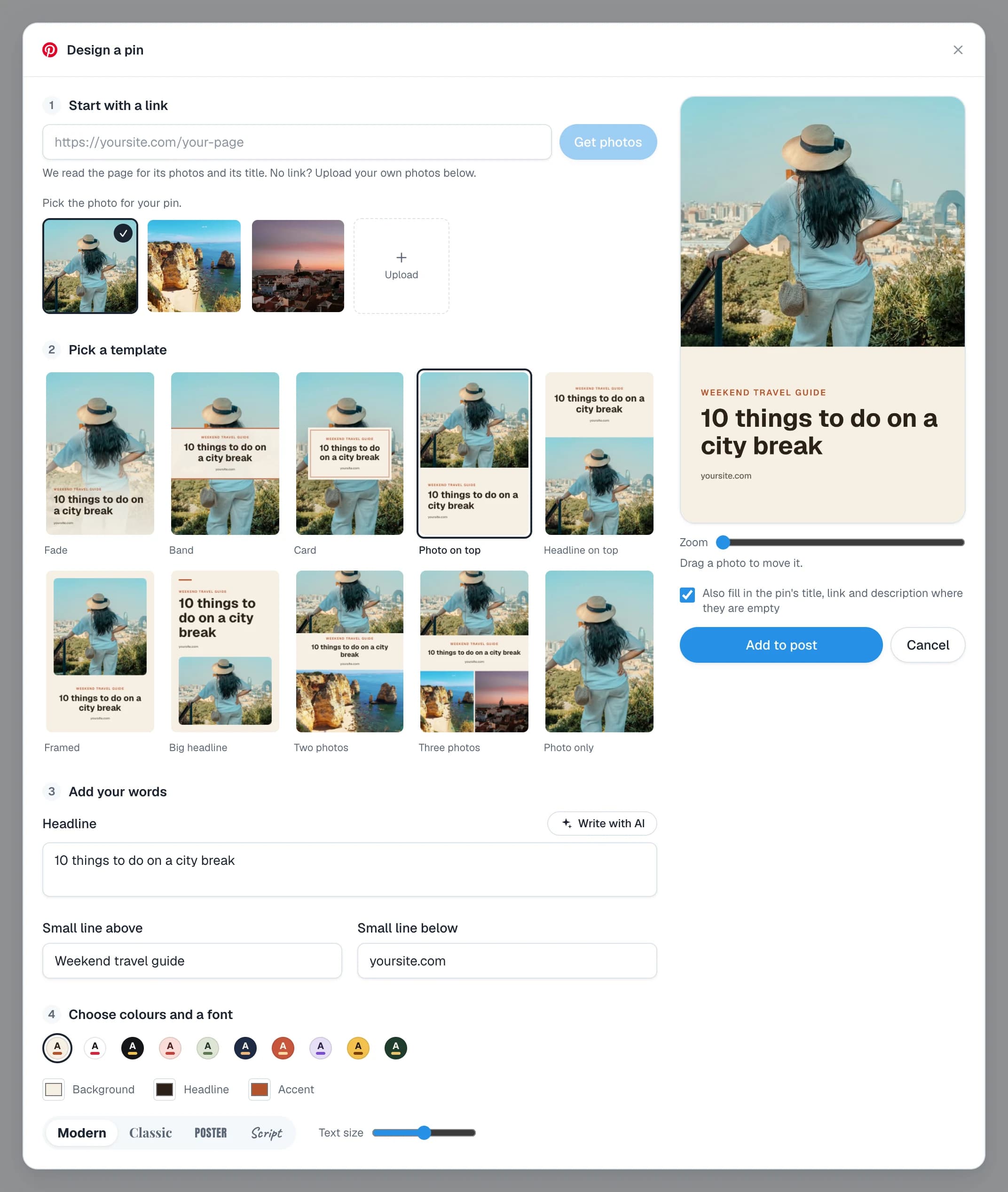
A resized photo is a start. A pin with a headline on it does better. In Posttyy, tick your Pinterest account on a new post and press Design a pin. Every pin it makes is 1,000 × 1,500 pixels.
Common questions
What is the best Pinterest pin size in 2026?
1,000 × 1,500 pixels, which is a 2:3 shape. It is the size Pinterest recommends.
Can I use a square image on Pinterest?
Yes. A square pin works, but it takes less room in the feed than a 2:3 pin beside it.
What happens if my pin is too tall?
Pinterest says a pin taller than 2:3 might get cut off in the feed. People see the top and must open the pin to see the rest.
Is 1080 × 1920 good for Pinterest?
It is the 9:16 shape used for phone video. For a picture pin, 2:3 is the better choice, because a 9:16 picture is taller than Pinterest recommends.
What is the smallest size that still looks good?
Keep to at least 1,000 pixels wide. A smaller picture can look soft on a large screen.
When your pin is ready, see the guide to scheduling Pinterest pins.