

Old advice said to pin 15 to 25 times a day. That advice is out of date. Pinterest now cares more about new pictures than about volume. This guide gives a number for your type of account, and shows how to keep to it without opening Pinterest every day.
The quick answer
- Most accounts: 1 to 5 new pins a day.
- A new account: 3 to 5 new pins a week.
- A shop with many products: 5 to 10 new pins a day.
- A steady pace matters more than a high number.
How many pins for your type of account
| Account | New pins | Why |
|---|---|---|
| New account, under 6 months | 3 to 5 a week | Pinterest is still learning what your account is about |
| Blogger or creator | 1 to 3 a day | Enough to make several pins for each post |
| Shop with many products | 5 to 10 a day | Each product and each season gives new pictures |
| Service business | 4 to 5 a week | Fewer pages to link to |
Pinterest gives no daily number of its own. Its advice is that quality and relevance matter more than how often you post. The table is the best public guidance, not a rule from Pinterest.
Why fewer pins now work better
- Pinterest prefers new pictures. A pin with a picture Pinterest has not seen is a fresh pin. Fresh pins get more reach than the same picture posted again.
- Repeats can look like spam. A high number is only possible when you repeat pictures. That is the risk.
- A pin lasts for months. People find it through search long after you post it. You do not need to post again to keep it alive.
What Pinterest treats as spam
- The same picture posted again and again.
- Many pins to one link within a few minutes.
- Pins on boards that have nothing to do with the pin.
- A sudden jump from 2 pins a day to 50.
Five different pins to one blog post, spread over five days, is not spam. Five copies of one pin in an hour is.
How to spread your pins out
- Post one pin a day for each link. Ten pins for a blog post then last ten days.
- Run several links together. Three blog posts at one pin a day each is three pins a day, all to different pages.
- Use the whole day. Three pins at 9:00, 14:00 and 20:00 are better than three pins at 9:00.
- Do not use a fixed timetable. Exactly 9:00 every day looks like a machine.
- Go up slowly. Add one pin a day each week, not twenty at once.
How to keep the pace with Posttyy
Posttyy has a page named Bulk pins. It makes up to 30 pins from one link, then spreads them for you.
- Open Bulk pins in the sidebar.
- Paste a link and press Get photos.
- Choose how many pins you want.
- Pick a Board and a Start on day.
- Type a number in Pins a day.
- Under Post between, set the hours. They start at 08:00 to 22:00.
- Press the Schedule button.
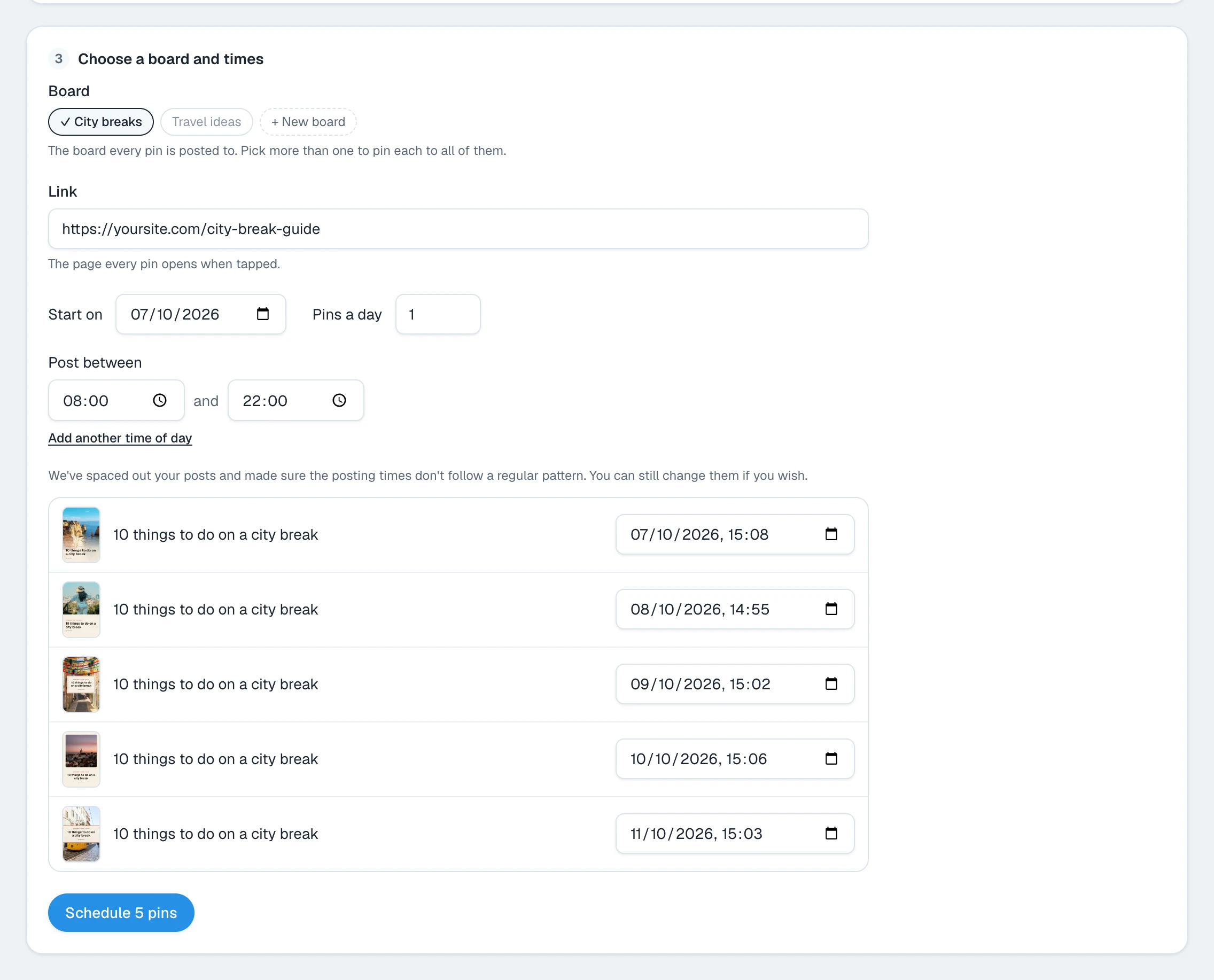
Posttyy divides your hours evenly between the pins, then moves each time by up to ten minutes. So no two days have the same times. You can change any time before you schedule.
Common questions
Is there a limit on pins per day?
Pinterest does not publish a daily limit for normal use. The practical limit is how many new pictures you can make. Repeated pictures in high numbers can be marked as spam.
Is one pin a day enough?
Yes. One new pin every day is a good pace for a blog or a small shop, and it is better than seven pins on one day.
Should I still pin 15 to 25 times a day?
No. That advice is from the years when repins counted the same as new pins. A smaller number of new pictures now does better.
Do repins of other people's pins count?
They add to your activity, but they do not bring visitors to your site. Count your own new pins first.
Does it matter what time I pin?
A little. A pin is found through search for months, so the hour matters less than on other networks. Spread your pins through the day.
For the hour of the day, see the best time to post on Pinterest. To make several pins for one page, see how to make multiple pins for one blog post.