

Pinterest is a search engine. People type what they want, and Pinterest shows pins that match. The words in your pin title and description tell Pinterest which searches your pin belongs in. This guide shows how long each can be, where to find the right words, and formulas you can copy.
The quick answer
- Title: up to 100 characters. Put the main search phrase in the first 40.
- Description: up to 800 characters. Two or three sentences with two or three search phrases.
- Write sentences for a person. Do not write a list of keywords.
- Find your phrases in Pinterest's own search box.
How long each part can be
| Part | Limit | What people see |
|---|---|---|
| Pin title | 100 characters | The first 40 characters may show in the feed |
| Description | 800 characters | The first lines show when the pin is opened |
| Words on the picture | No fixed limit | Always shown. Keep to a short headline |
Step 1: Find the words people search for
- Open Pinterest and click the search box.
- Type the subject of your pin, such as “chicken pasta”.
- Read the suggestions under the box. These are phrases people really search for.
- Press Enter. Look at the words that appear above the results, such as “easy”, “creamy” or “one pan”. People add these to make the search narrower.
- Write down five to ten phrases that fit your page.
Choose phrases of three or four words. “Recipes” is too wide to compete for. “Easy chicken pasta recipes” is a search you can show in.
Step 2: Write the title
A formula that works:
Main search phrase + what makes this one different
| Weak title | Better title | Why |
|---|---|---|
| Dinner tonight! | Easy chicken pasta recipe: ready in 30 minutes | It starts with a phrase people search for |
| New in the shop | Personalised leather keyring: a gift for dad | It says what the product is and who it is for |
| My trip to Lisbon | 3 days in Lisbon: a first-time visitor's plan | It says what the reader gets |
- Put the search phrase first. Only about 40 characters show in the feed.
- Use numbers when you have them: 30 minutes, 10 ideas, 3 days.
- Do not write the whole title in capital letters.
- Do not promise what the page does not give.
Step 3: Write the description
Use three sentences:
- Say what the pin shows. Use your main phrase.
- Say why it is useful. Use a second phrase.
- Say what to do next. “Tap for the full recipe.”
An example for a recipe:
This easy chicken pasta recipe uses one pan and is ready in 30 minutes. It is a simple weeknight dinner idea for a busy family, with ingredients you already have. Tap for the full recipe and a shopping list.
That description has three search phrases: “easy chicken pasta recipe”, “ready in 30 minutes” and “weeknight dinner idea”. It still reads like a person wrote it.
What not to do
- Do not list keywords. “Chicken, pasta, dinner, easy, recipe, quick” reads as spam to people and to Pinterest.
- Do not copy one description to every pin. Each pin then competes for the same search.
- Do not depend on hashtags. Plain search phrases in a sentence do the work.
- Do not leave the fields empty. A pin without words is hard for Pinterest to place.
Where to type them in Posttyy
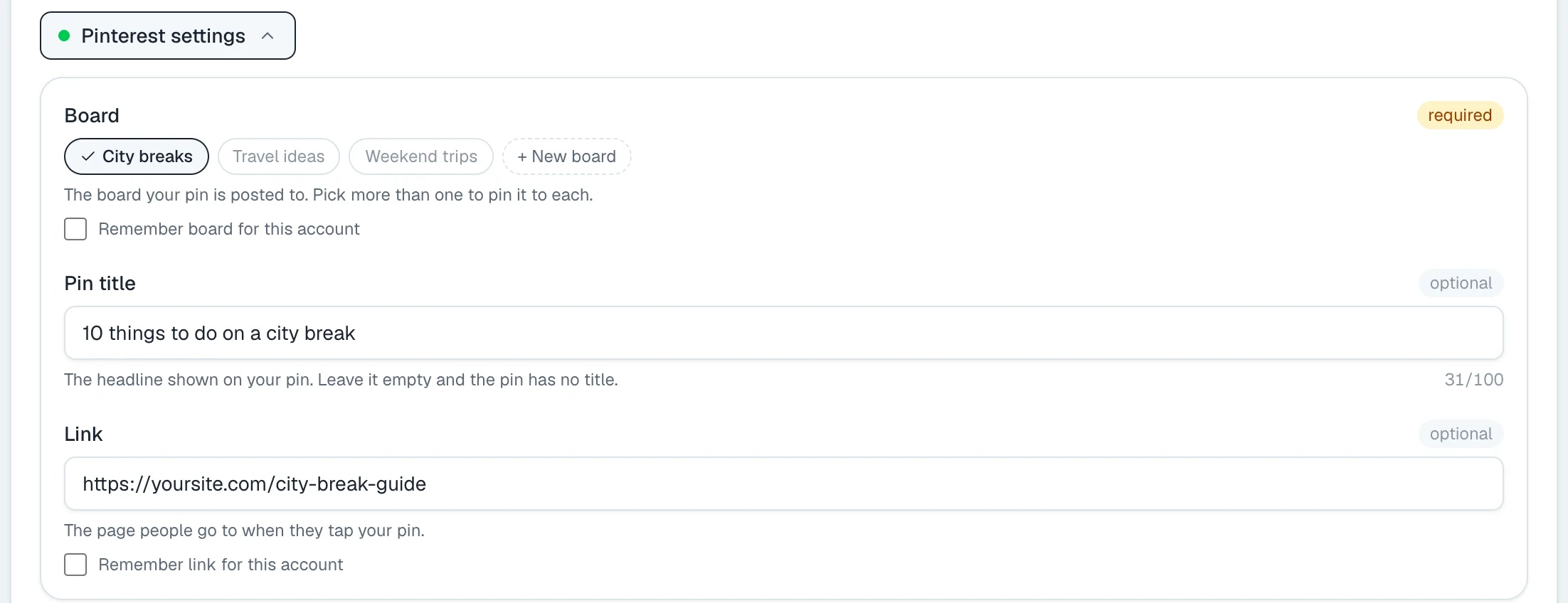
In Posttyy, the description is the caption of your post. The title is in Pinterest settings, under the caption, with the board and the link.
Write many at once
Ten pins for one page need ten titles and ten descriptions. Bulk pins can write them.
- Open Bulk pins and make your pins from a link.
- Type your phrases in Keywords for the AI, with commas between. You can give up to 20.
- Click the AI symbol in the Pin title box, then in the Description box.
- Read each one. Point at a pin and press the pencil to change its words.
Posttyy gives each pin different keywords from your list, so the pins aim at different searches. The AI is optional. You can type every word yourself.
Common questions
How long should a Pinterest description be?
Two or three sentences is enough. Pinterest allows up to 800 characters, but you do not need to fill them.
Does the pin title matter for search?
Yes. The title and the description are the main words Pinterest reads to decide which searches a pin belongs in.
Should I use hashtags on Pinterest?
You do not need them. Search phrases written in a normal sentence do the same work.
Can I use the same description on several pins?
It is better not to. Give each pin different phrases, so each pin can show in a different search.
Do the words on the picture count?
They count for the person who looks at the pin: a clear headline says what they get when they tap. The title and the description are where your keywords belong.
To make several pins for one page, see how to make multiple pins for one blog post.