

On most social networks a post is finished in a day. On Pinterest a pin is found through search for months, and each pin links to your site. That is why bloggers use it. This guide is a plan you can follow from the start: the setup, the pins, the words and a weekly routine.
The quick answer
- Set up a business account and five to ten boards.
- Make five to ten different pins for each blog post.
- Put search phrases in each pin title and description.
- Post one to three new pins every day.
- After a month, check which pins sent readers and make more like them.
Why Pinterest works for a blog
- It is a search engine. People type what they want, such as “easy dinner ideas”, and Pinterest shows pins that match.
- Every pin has a link. A tap takes the reader to your post.
- Pins last. A pin you post today can send readers for months.
- You do not need followers. Search shows your pin to people who have never seen your account.
It works best for subjects people plan and save: food, home, travel, craft, style, money, health and parenting.
Step 1: Set up your account
- Use a business account. It is free, and it gives you analytics.
- Name it for your subject. “Maya Cooks | Easy family dinners” tells people and Pinterest what you write about.
- Claim your website. Pinterest then knows that pins to your site are yours.
Step 2: Make boards for your subjects
Make one board for each main subject of your blog. Name it with a search phrase.
| Blog subject | Board names |
|---|---|
| Food | Easy weeknight dinners, 30 minute recipes, Healthy lunch ideas |
| Travel | City break ideas, Europe travel tips, Budget travel |
| Home | Small living room ideas, Kitchen organisation, DIY home decor |
Write a description for each board, with two or three phrases in normal sentences.
Step 3: Make several pins for each post
One pin gives a post one chance. Five pins with different photos and headlines give it five. Each pin with a new picture is a fresh pin, which is what Pinterest prefers.
- Make each pin tall: 1,000 × 1,500 pixels.
- Put a short headline on the picture.
- Use a different photo from the post on each pin.
- Say the promise in a different way on each headline.
Posttyy does this from the post itself. Open Bulk pins, paste the link and press Get photos. It makes up to 30 pins, each with a different photo and layout.
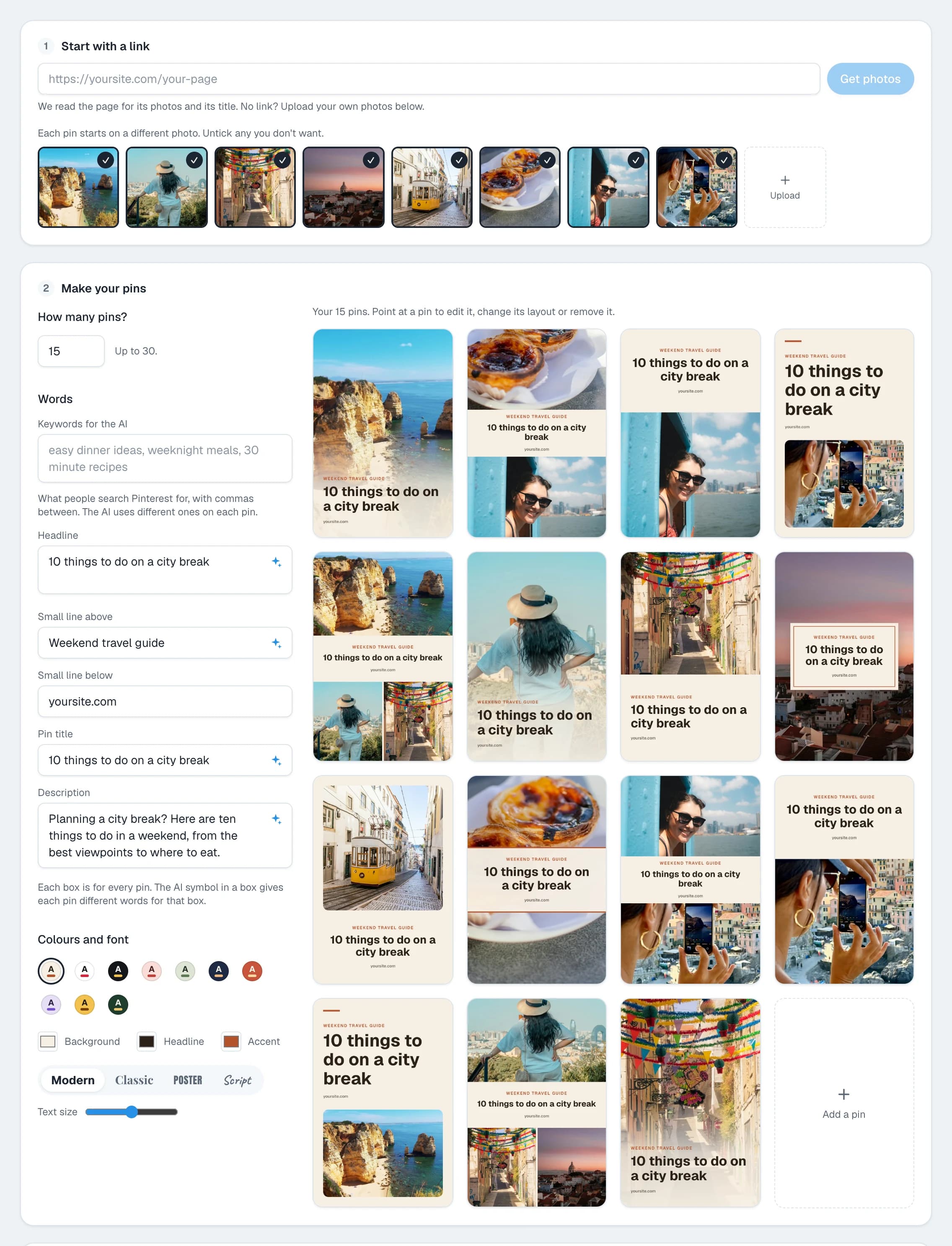
See how to make multiple pins for one blog post for what to change between pins.
Step 4: Use the words people search for
- Type the subject of your post in Pinterest's search box.
- Write down the suggestions that fit.
- Put the main phrase first in the pin title. A title can be up to 100 characters, and about 40 show in the feed.
- Use two or three phrases in the description, in sentences.
- Give each pin different phrases.
The guide to pin titles and descriptions has formulas and examples.
Step 5: Pin every day
- One to three new pins a day is enough for a blog.
- Post one pin a day for each blog post, not five in an hour.
- Run several posts together, so each day's pins go to different pages.
- Pin for a season six to eight weeks before it.
You do not need to open Pinterest daily. Schedule a week or a month in one sitting. In Bulk pins, pick a Start on day and the Pins a day, and Posttyy gives each pin a time.
Step 6: Make your blog ready for the visit
- Match the pin. The post must give what the pin promised, near the top.
- Make it fast on a phone. Most Pinterest use is on a phone.
- Add one tall picture to each post. Readers who save your post then save a picture that looks good as a pin.
- Give a next step. A related post or a sign-up box, so the visit is not the end.
Step 7: Check what works each month
- On Pinterest, open your analytics.
- Sort your pins by outbound clicks. This is the number of people who went to your site.
- Find your top five pins.
- Look at what they share: the subject, the kind of photo or the headline.
- Make more pins like them, and more posts on those subjects.
Count clicks, not impressions. A pin that many people see and nobody taps brings no readers.
How long it takes
Pinterest is slow at the start. A new pin can take weeks to find its place in search, and a new account takes longer. Plan for three to six months of steady pins before you judge the result. The pins you post in that time keep working after it.
A weekly routine of one hour
| Time | Task |
|---|---|
| 10 minutes | Choose two blog posts: one new, one old |
| 10 minutes | Find five search phrases for each on Pinterest |
| 30 minutes | Make seven pins for each in Bulk pins and check their words |
| 10 minutes | Schedule them at one a day for each post |
Common questions
How long does Pinterest take to bring traffic?
Plan for three to six months of steady pins. Some pins get clicks in days, but most take weeks to be found through search.
Do I need many followers?
No. Most people find a pin through search or their home feed, not from your follower list.
How many pins should I make for each blog post?
Five to ten, each with a different photo or headline. Post them days apart.
Does Pinterest work for every blog subject?
It works best for subjects people plan and save, such as food, home, travel, craft and style. It is weaker for news and for subjects with no pictures.
Can I pin old blog posts?
Yes. An old post with a new picture is a fresh pin. Your old posts are the fastest place to start.
For every step of scheduling, see the guide to scheduling Pinterest pins.