
A Pinterest scheduler posts your pins at the times you choose, so you do not open Pinterest every day. Some schedulers only post pins you have made. Others also make the pins. This guide compares nine, with what each costs and what each limits.
Posttyy publishes this article, and Posttyy is on the list. We've said plainly where it falls short. Tailwind's prices were read from its own website on 7 October 2026, and the other tools' prices on 25 September 2026.
The quick comparison
| Tool | Cheapest paid price | Free plan | Makes pins for you |
|---|---|---|---|
| Posttyy | $19 a month for 2 accounts | No | Yes |
| Pinterest's own scheduler | Free | Yes, 10 scheduled pins at a time | No |
| Tailwind | $29.99 a month per Pinterest account | Not stated on its pricing page | Yes |
| Buffer | $6 per channel a month ($5 billed yearly) | 3 channels, 10 scheduled posts per channel | No |
| Later | Starter plan: 1 user, 1 social set, 30 posts per profile a month | a limited plan for creators | No |
| Publer | $5 per account a month (Professional) | 3 social accounts, not including X | No |
| Metricool | Starter plan, priced by how many brands you manage | 1 brand, one profile per network, 20 published posts a month | No |
| SocialPilot | $30 a month for 7 accounts and 1 user | No | No |
| Hootsuite | $99 a month (Standard) | No | No |
What to look for in a Pinterest scheduler
- How many pins you can schedule. Pinterest rewards steady pinning. A limit of 10 or 20 pins means you return every week.
- Whether it makes the pins. Designing each pin is the slow part. A tool that makes them saves the most time.
- Whether it spaces pins out. Many pins to one link in a few minutes looks like spam.
- Boards, titles and links. The tool must let you set all three on each pin.
- Your other networks. One tool for Pinterest and Instagram is cheaper than two.
1. Posttyy
Best for: making many pins fast and scheduling them with no limit.
Posttyy has two ways to pin. In the composer you schedule one pin with a board, a pin title and a link. On the Bulk pins page you paste a link, and Posttyy makes up to 30 pins with different photos and layouts. It then gives each pin a time between the hours you choose, and moves each time by a few minutes so there is no fixed pattern.
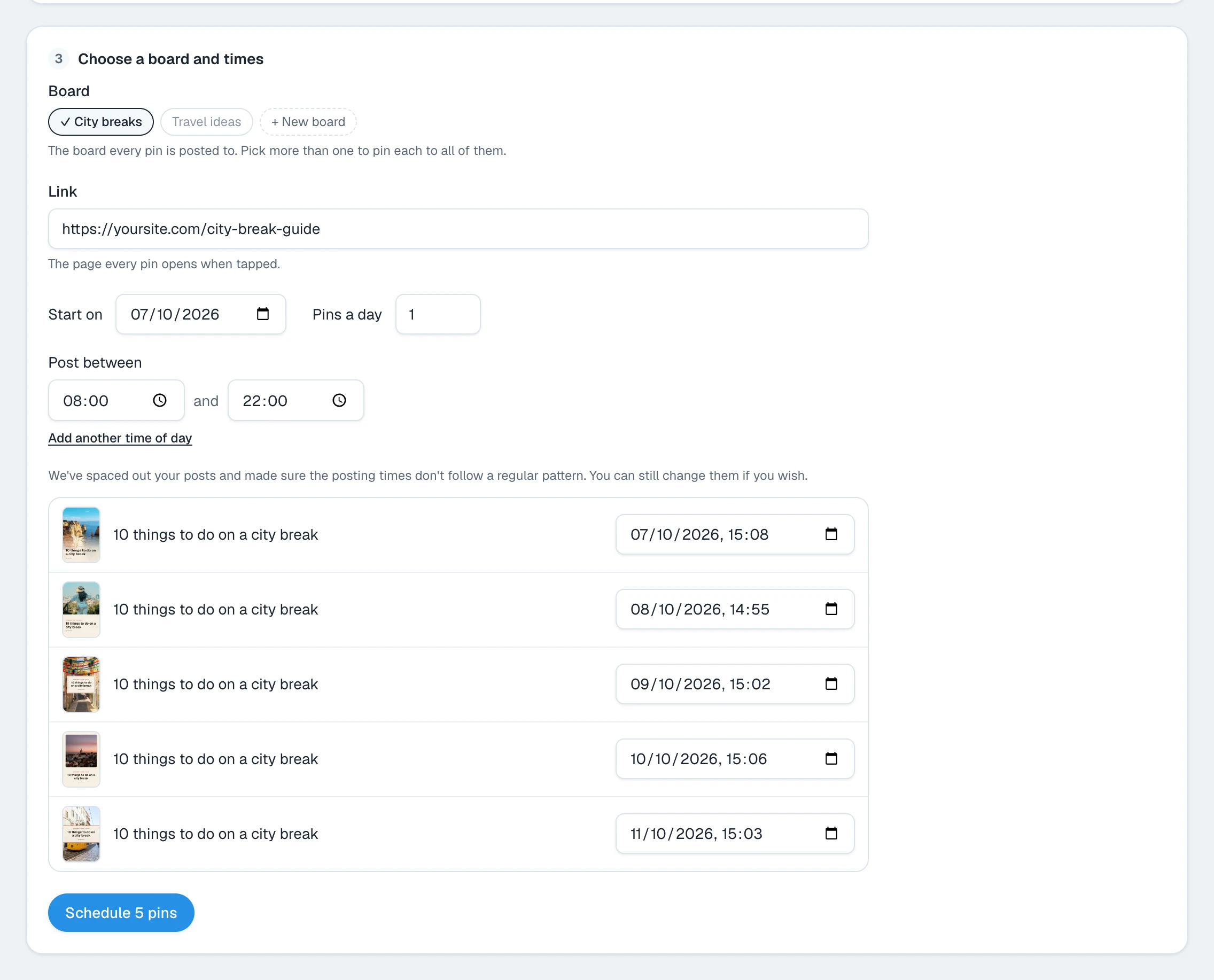
- Price: $19 a month for 2 accounts, $39 for 10, $59 for unlimited.
- Good: unlimited scheduled pins, pins made from a link or your own photos, and the same post to X, Instagram, Threads, Facebook, TikTok, LinkedIn, Pinterest and YouTube.
- Not so good: it pins photos, not video. It has no Pinterest keyword search tool. There is no free plan, only a 7-day trial.
2. Pinterest's own scheduler
Best for: a few pins a week at no cost.
- Price: free. You need a Pinterest business account, which is also free.
- Good: nothing to install, and it schedules video pins.
- Not so good: 10 scheduled pins at a time, up to 30 days ahead, one pin at a time.
3. Tailwind
Best for: people who use only Pinterest and want keyword tools.
- Price: $29.99a month for Pin Scheduling & Creation, or $17.99 a month billed yearly. The price is for one Pinterest account.
- Good: it makes pins, spaces them out and sells separate tools for Pinterest SEO and engagement.
- Not so good: scheduling a pin spends 1 credit, and the plan has 300 credits a month. More cost $10 per 100. See Tailwind alternatives.
4. Buffer
Best for: a simple tool for one or two channels.
- Price: $6 per channel a month ($5 billed yearly).
- Free plan: 3 channels, 10 scheduled posts per channel.
- Not so good: 10 scheduled posts on the free plan is about a week of pins.
5. Later
Best for: planning Pinterest beside Instagram.
- Price: Starter plan: 1 user, 1 social set, 30 posts per profile a month.
- Not so good: the monthly post limit on the Starter plan.
6. Publer
Best for: a low price per account.
- Price: $5 per account a month (Professional).
- Free plan: 3 social accounts, not including X.
7. Metricool
Best for: reports across several networks.
- Price: Starter plan, priced by how many brands you manage.
- Free plan: 1 brand, one profile per network, 20 published posts a month.
8. SocialPilot
Best for: small agencies.
- Price: $30 a month for 7 accounts and 1 user.
- Not so good: no free plan.
9. Hootsuite
Best for: large teams.
- Price: $99 a month (Standard), with a 30 days free trial.
- Not so good: the price, for a person with one Pinterest account.
Which Pinterest scheduler should you choose?
- You want pins made and scheduled for you: Posttyy or Tailwind.
- You pin a few times a week: Pinterest's own scheduler.
- You already design your pins: Buffer or Publer.
- You manage clients: SocialPilot.
Common questions
Does Pinterest have its own scheduler?
Yes. A Pinterest business account can schedule a pin up to 30 days ahead, and can hold 10 scheduled pins at a time.
What is the best free Pinterest scheduler?
Pinterest's own scheduler, for most people. It is free, but it holds only 10 scheduled pins at a time.
Is it safe to use a Pinterest scheduler?
Yes, when the tool connects through Pinterest's own sign-in. Posttyy does, and it never sees your Pinterest password.
Do scheduled pins get less reach?
Pinterest does not say that they do. What matters is that each pin has a new picture and that pins are spread out.
For every step in Posttyy, see the guide to scheduling Pinterest pins. For schedulers that cover all networks, see the best social media scheduling tools.